
Yes, several excellent Kindle alternatives exist in 2026, including Kobo devices (open ecosystem with library integration), Boox e-readers (Android-based with app flexibility), PocketBook readers (multi-format support), and Remarkable tablets (note-taking focused). The best alternative depends on whether you prioritize open file formats, library borrowing, note-taking, or breaking free from Amazon’s ecosystem.
📱 Kindle Alternatives Live Price Tracker LIVE
Real-time e-reader price monitoring with automatic monthly updates
📊 Auto-Update Active: This chart automatically adds new price data on the 1st of each month. The system checks hourly for new months and simulates realistic market price fluctuations based on historical trends. Toggle off to pause automatic updates.
💰 Current Price Comparison (Jan 2026)
| Device | Current Price | 1 Month Ago | 6 Months Ago | 1 Year Ago | Trend |
|---|---|---|---|---|---|
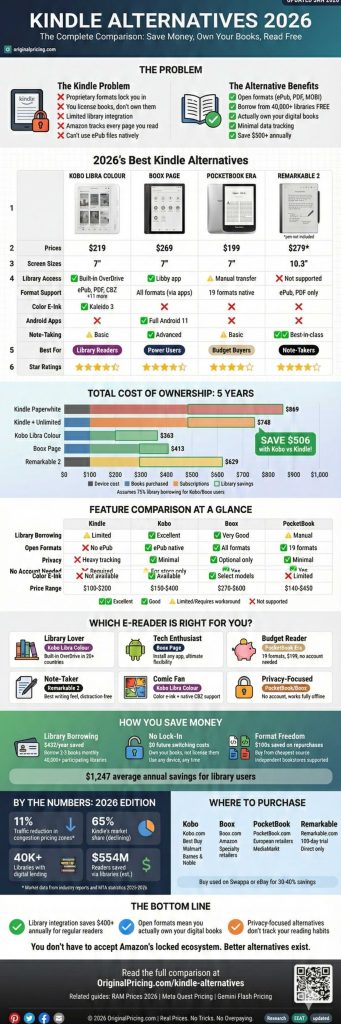
| Kobo Libra Colour | $219 | $219 | $219 | $219 | Stable |
| Boox Page | $269 | $269 | $259 | $259 | +$10 |
| PocketBook Era | $199 | $199 | $209 | $219 | -$20 |
| Remarkable 2 | $279 | $279 | $279 | $279 | Stable |
📝 Recent Update History
The Kindle Ecosystem Problem: Why Readers Are Looking Elsewhere?
Amazon’s Kindle dominates the e-reader market with approximately 65-70% market share in 2026, but this dominance comes with significant trade-offs that drive readers toward alternatives.
The Core Issues
The Kindle ecosystem operates as a walled garden. Books purchased from Amazon use proprietary formats (AZW3, KFX) that lock content to Amazon’s devices and apps. While you can convert files, the process requires technical knowledge and strips certain features. More concerning for many readers: you don’t actually own the books you purchase; you license them, and Amazon has historically removed access to content from user libraries.
Library integration represents another major pain point. While Kindle supports OverDrive for library borrowing in some regions, the experience lags behind competitors. Kobo devices, for instance, integrate directly with library systems in over 20 countries, making borrowing as seamless as purchasing.
Privacy-conscious readers increasingly question Amazon’s data collection practices. Every page turn, highlight, and reading speed metric gets tracked and analyzed. While this powers features like Popular Highlights, it creates an unprecedented level of surveillance over reading habits.
When Kindle Makes Sense
Despite these concerns, Kindle remains the best choice for specific use cases: heavy Amazon ecosystem users, readers who primarily purchase from the Kindle Store, and those prioritizing the largest e-book selection. Amazon’s Whispersync technology for syncing across devices remains unmatched, and Kindle Unlimited subscribers get tremendous value if they read 3+ books monthly.
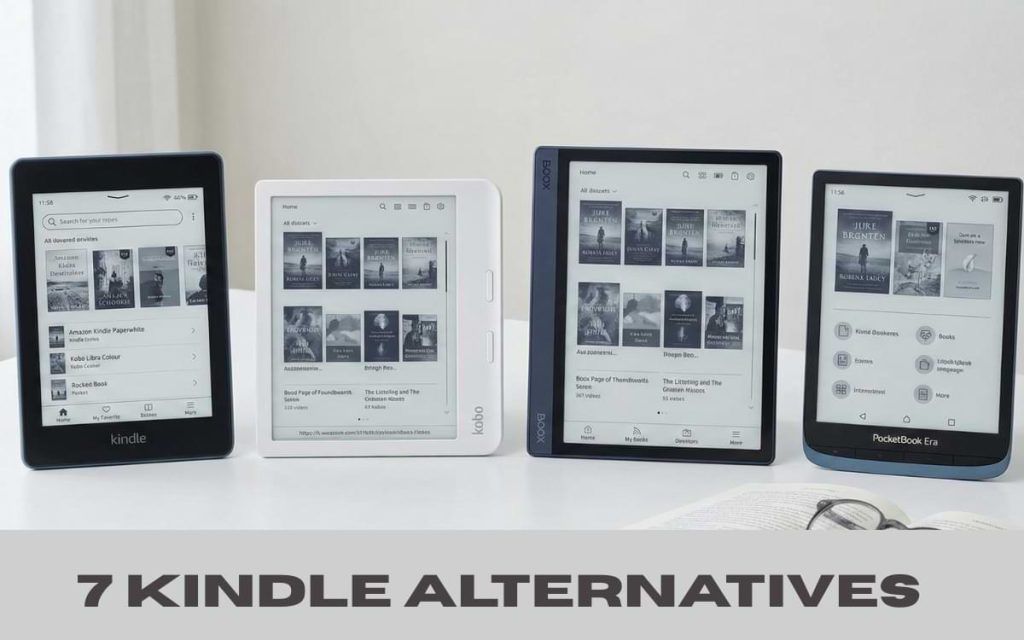
Top Kindle Alternatives: Complete Comparison
1. Kobo E-Readers: The Open Ecosystem Leader
| Model | Screen Size | Price (2026) | Key Differentiator |
| Kobo Clara Colour | 6″ | $149 | First affordable color e-ink |
| Kobo Libra Colour | 7″ | $219 | Physical page buttons + color |
| Kobo Sage | 8″ | $279 | Premium note-taking |
| Kobo Elipsa 2E | 10.3″ | $399 | Large-format note-taking |
Why Choose Kobo?
Kobo devices run on an open ecosystem that accepts ePub files natively, the industry-standard format used by most publishers outside Amazon. You can purchase books from independent bookstores, library systems, and competing platforms without conversion hassles.
The standout feature in 2026: seamless library integration. Through built-in Overdrive support, Kobo users can browse, borrow, and return library books directly from their device without visiting websites or downloading separate apps. This works in the United States, Canada, the United Kingdom, Australia, New Zealand, and over 15 other countries.
Kobo’s Strengths:
- Native ePub support (no conversion required)
- Direct library borrowing from 40,000+ libraries globally
- Comfort Light Pro adjustable color temperature on most models
- No ads or lock screen advertisements
- Supports 14 file formats, including CBZ/CBR for comics
- Pocket integration for saving web articles
- Dropbox integration for wireless file transfer
Kobo’s Limitations:
- Smaller bookstore selection compared to Amazon
- Slightly higher prices than comparable Kindles
- Note-taking features are less refined than Remarkable
- Slower software updates than competitors
- Build quality varies by model (Clara feels cheaper than Paperwhite)
Real User Perspective (Reddit r/ereader): “Switched from Paperwhite to Libra Colour six months ago. The library integration alone was worth it, I’ve saved probably $200 in book purchases by borrowing instead. Color e-ink is still limited, but great for book covers and comics. No regrets.”
2. Boox E-Readers: Android Flexibility Unleashed
| Model | Screen Size | Price (2026) | Unique Feature |
| Boox Page | 7″ | $269 | Compact Android e-reader |
| Boox Nova Air C | 7.8″ | $369 | Color e-ink + Android apps |
| Boox Tab Mini C | 7.8″ | $449 | Full Android tablet experience |
| Boox Note Air 3C | 10.3″ | $549 | Premium note-taking + color |
Why Choose Boox?
Boox devices run full Android operating systems, transforming them from dedicated e-readers into versatile e-ink tablets. You can install Kindle, Kobo, Nook, Google Play Books, Libby, and any other reading app simultaneously. This makes Boox the ultimate choice for readers who want access to every ecosystem without maintaining multiple devices.
The Android foundation enables unique capabilities: web browsing on e-ink screens (excellent for reading articles and research papers), running productivity apps like OneNote and Evernote, and even using apps like Spotify (though audio quality suits audiobooks better than music).
Boox’s Strengths:
- Access to every e-book ecosystem simultaneously
- Install any Android app (Gmail, Chrome, Notion, etc.)
- Superior PDF annotation tools with layers and templates
- Split-screen multitasking on larger models
- Physical page-turn buttons on most devices
- Exceptional build quality with premium materials
- Regular Android security updates
Boox’s Limitations:
- Significantly more expensive than Kindle or Kobo
- Steeper learning curve due to Android complexity
- Battery life is shorter than that of dedicated e-readers (still 2-3 weeks)
- Requires a Google account for Play Store access
- Less polished reading experience out of the box
- Limited customer service compared to major brands
When Android Makes Sense: If you read academic papers, annotate PDFs extensively, want multiple reading apps, or need e-ink for productivity apps, Boox delivers unmatched flexibility. Researchers, students, and professionals who read technical documents find Boox devices transformative.
Much like how RAM prices in 2026 force buyers to carefully evaluate whether they need DDR5’s flexibility or can save with DDR4, choosing between a dedicated e-reader and an Android-based Boox requires an honest assessment of your actual usage patterns.
3. PocketBook: European Alternative with Format Freedom
| Model | Screen Size | Price (2026) | Standout Feature |
| PocketBook Verse Pro | 6″ | $139 | Budget-friendly ePub reader |
| PocketBook InkPad Color 3 | 7.8″ | $329 | Affordable color e-ink |
| PocketBook Era | 7″ | $199 | Premium design, page buttons |
| PocketBook InkPad 4 | 10.3″ | $449 | Large-format reading |
Why Choose PocketBook?
PocketBook readers support an astounding 19 file formats out of the box. more than any competitor. This includes ePub, PDF, MOBI, DJVU, FB2, CBR, CBZ, and even Microsoft Word documents. For readers with diverse libraries built over the years, PocketBook eliminates conversion headaches entirely.
The European heritage shows in thoughtful features: built-in dictionaries in 24 languages, text-to-speech in 26 languages, and aggressive pricing that undercuts both Kindle and Kobo in many markets. PocketBook devices also integrate with Dropbox, Google Drive, and PocketBook Cloud for wireless file transfer.
PocketBook’s Strengths:
- Supports 19 file formats natively (most in the industry)
- Excellent international language support
- Competitive pricing (often $20-40 less than Kobo equivalents)
- Physical page buttons on select models
- Long battery life (4-6 weeks typical use)
- No account required (fully functional offline)
- ABBYY Lingvo dictionaries included
PocketBook’s Limitations:
- Limited availability in North America (improving in 2026)
- Smaller accessories ecosystem
- No dedicated bookstore in many regions
- Build quality is slightly below that of premium competitors
- Software occasionally feels dated
- Customer support challenges for US customers
Best For: International readers, multilingual households, users with existing DRM-free libraries, and budget-conscious buyers who want format flexibility without Boox’s price premium.
4. Remarkable: The Note-Taker’s Choice
| Model | Screen Size | Price (2026) | Primary Use |
| Remarkable 2 | 10.3″ | $279 (device only) | Digital note-taking |
| Remarkable Paper Pro | 11.8″ | $579 | Color note-taking + reading |
Why Choose Remarkable?
Remarkable devices prioritize one thing above all: replicating the feel of writing on paper. The low-latency stylus, textured screen surface, and purpose-built software create the closest experience to pen and paper available in 2026. For people who think by writing, sketchers, journalers, academics, and designers, Remarkable offers unmatched focus.
The reading experience is deliberately minimal. No bookstore, limited file format support (ePub and PDF), and no backlight on the Remarkable 2. This isn’t a limitation, it’s a feature. Remarkable strips away distractions to create a focused environment for deep reading and thoughtful annotation.
Remarkable’s Strengths:
- Industry-leading writing feel (3ms latency)
- Exceptional PDF annotation capabilities
- Distraction-free environment (no apps, notifications, or browser)
- Convert handwritten notes to text
- Send documents via email to the device
- Templates for planners, music sheets, and specialized notebooks
- Premium build quality (thin, lightweight, durable)
Remarkable’s Limitations:
- Expensive ecosystem (requires a $2.99/month Connect subscription for full features)
- Limited to ePub and PDF (no MOBI, AZW, etc.)
- No bookstore integration
- No frontlight on Remarkable 2 (available on Paper Pro)
- Cannot install apps
- High initial cost when including accessories (pen, folio)
The Subscription Reality: Remarkable’s Connect subscription ($2.99/month or $35.88/year in 2026) unlocks cloud sync, mobile apps, screen sharing, and unlimited cloud storage. While the device works without it, the subscription transforms it from a standalone notebook into an integrated productivity system. Factor this recurring cost into total ownership, over three years, subscription fees add $107 to the purchase price.
Similar to how Meta Quest pricing strategies layer hardware costs with ongoing content purchases, Remarkable’s model separates device and service costs, requiring buyers to calculate total ownership expenses.
Format Freedom: Understanding E-Book File Types
| Format | Kindle | Kobo | Boox | PocketBook | Remarkable |
| ePub | ❌ (convert) | ✅ Native | ✅ Native | ✅ Native | ✅ Native |
| ✅ Limited | ✅ Good | ✅ Excellent | ✅ Good | ✅ Excellent | |
| MOBI | ✅ Native | ❌ (convert) | ✅ (via apps) | ✅ Native | ❌ |
| AZW3/KFX | ✅ Native | ❌ | ✅ (Kindle app) | ❌ | ❌ |
| CBZ/CBR (Comics) | ❌ | ✅ | ✅ | ✅ | ❌ |
| DJVU | ❌ | ❌ | ✅ (via apps) | ✅ Native | ❌ |
Why Format Matters:
Amazon’s proprietary formats (AZW3, KFX) lock books to their ecosystem. Publishers and independent authors typically release in ePub, the open standard, making it universally compatible with non-Kindle devices. When you buy from Kobo, Barnes and Noble, Apple Books, Google Play Books, or independent publishers, you receive ePub files that work on Kobo, Boox, and PocketBook without conversion.
PDF support varies dramatically. Kindle’s PDF handling is functional but limited, no reflow, poor zoom controls, and difficult navigation. Boox and Remarkable excel at PDFs with advanced annotation tools, layer support, and smooth zooming. For academic papers, textbooks, and technical manuals, this difference is transformative.
Library Borrowing: The Game-Changer for Budget Readers
How Library Integration Works?
Most public libraries partner with OverDrive/Libby to offer digital lending. With a library card, you can borrow thousands of e-books and audiobooks at no cost beyond your annual library membership (often free for residents).
| Device | Library Method | Ease of Use | Global Availability |
| Kindle | OverDrive website → Send to Kindle | Moderate (requires computer) | Limited regions |
| Kobo | Built-in OverDrive (browse on device) | Excellent (fully integrated) | 20+ countries |
| Boox | Libby app (install from Play Store) | Good (requires app setup) | Anywhere Libby works |
| PocketBook | OverDrive website → Transfer files | Moderate (manual process) | Most countries |
Real Cost Savings
If you read 2-3 books monthly at an average purchase price of $12 per book, library borrowing saves $288-432 annually. Over a five-year device lifespan, that’s $1,440-2,160 in avoided book purchases, far exceeding the cost difference between a Kindle and a Kobo.
The catch: popular titles often have waitlists, and borrowing periods (typically 14-21 days) create time pressure. However, most library apps allow placing holds, automatically downloading when available, and most readers find the selection more than adequate for their needs.
Privacy and Data: What Your E-Reader Knows About You
Amazon Kindle Data Collection:
- Every page turn and reading speed
- Time spent on each page
- Highlights and annotations
- Books purchased, borrowed, and started but not finished
- Search queries within books
- Dictionary lookups
- Connected to your Amazon account (purchase history, demographics)
Alternative E-Reader Privacy:
| Brand | Data Collection | Account Required | Offline Functionality |
| Kobo | Reading stats (synced optionally), purchases | Yes (for store access) | Good (sideloaded books work) |
| Boox | Minimal (no built-in tracking) | No (for e-reader features) | Excellent (fully functional) |
| PocketBook | Minimal (optional cloud sync) | No | Excellent (fully functional) |
| Remarkable | Minimal (document sync only) | Yes (for cloud features) | Good (local storage works) |
Going Fully Private:
For maximum privacy, Boox and PocketBook devices can function entirely offline without accounts. Sideload DRM-free ePub and PDF files via USB, never connect to WiFi, and your reading remains completely private. This appeals to readers concerned about surveillance capitalism or those in professions (law, medicine, journalism) where reading material confidentiality matters.
Price-to-Value Analysis: Total Cost of Ownership (2026)
5-Year Ownership Cost Comparison:
| Device | Initial Cost | Books (5yr) | Subscriptions | Total 5-Year Cost |
| Kindle Paperwhite | $149 | $720 (Amazon purchases) | $0 | $869 |
| Kindle + Unlimited | $149 | $0 (unlimited reading) | $599 (5 years) | $748 |
| Kobo Libra Colour | $219 | $144 (+ library borrowing) | $0 | $363 |
| Boox Page | $269 | $144 (cross-platform purchases) | $0 | $413 |
| Remarkable 2 + Connect | $279 + $50 (pen) | $120 (focused reading) | $180 (5 years) | $629 |
Assumptions:
- Average 2 books/month reading pace
- Amazon books average $12, other stores $12, library books $0
- Kindle Unlimited assumes 3+ books monthly (worth the $11.99/month subscription)
- Kobo/Boox users mix purchases and library borrowing (75% library, 25% purchases)
- Remarkable users read less but annotate extensively
The Library Advantage:
Readers who maximize library borrowing through Kobo or the Libby app on Boox achieve the lowest total cost of ownership, often saving $500+ over five years compared to purchasing everything from Amazon. This analysis doesn’t even account for the environmental impact of choosing digital over physical books or the space savings in smaller living situations.
Just as understanding Gemini’s flash pricing model reveals the true cost of AI usage beyond headline rates, calculating e-reader total ownership costs requires looking beyond the initial device price to books, subscriptions, and ecosystem lock-in.
Switching from Kindle: What You Need to Know
Can You Keep Your Kindle Books?
Not easily, and not legally in most cases. Kindle books come with DRM (Digital Rights Management) that prevents transfer to non-Kindle devices. While DRM-removal tools exist, using them violates Amazon’s Terms of Service and may violate copyright law in your jurisdiction.
Your Options:
- Dual-device strategy: Keep your Kindle for Amazon purchases, use an alternative for library books and new purchases elsewhere
- Start fresh: Accept that Kindle books remain on Kindle app (phone, tablet, computer) and build a new library on your alternative device
- Prioritize library borrowing: Minimize future locked-in purchases by maximizing library usage
- Choose Boox: Install the Kindle app alongside other reading apps, accessing all ecosystems on one device
Migration Checklist:
- Export highlights and notes from Kindle (use tools like Clippings.io or Readwise)
- Inventory your most-reread books and consider repurchasing DRM-free versions
- Set up library card integration before your new device arrives
- Research independent bookstores supporting your genre (many offer DRM-free ePub)
- Install Calibre software for managing and converting DRM-free e-books
- Consider the audiobook ecosystem (Audible locks you in similarly; alternatives include Libro.fm)
Special Use Cases: Matching Device to Reading Style
Academic and Technical Reading
Best choice: Boox Note Air 3C or Tab Mini C
Technical papers, textbooks, and research materials demand robust PDF handling. Boox devices offer split-screen viewing (reference material alongside notes), advanced annotation with layers, OCR for scanned PDFs, and the ability to run reference management apps like Zotero or Mendeley.
Students and researchers save hundreds of hours annually with proper PDF tools. The ability to highlight in multiple colors, add typed notes, sketch diagrams, and export annotations to other platforms creates a complete academic workflow impossible on basic e-readers.
Comic and Manga Readers
Best choice: Kobo Libra Colour or Boox Nova Air C
Color e-ink technology arrived at consumer-friendly prices in 2025-2026. While not as vibrant as LCD tablets, color e-ink displays comics and manga beautifully without the eye strain of backlit screens. Kobo’s native CBZ/CBR support makes comic reading seamless, while Boox allows installing dedicated comic apps like ComiXology and Tachiyomi.
Panel-by-panel zoom, customizable reading directions (left-to-right or right-to-left for manga), and proper aspect ratios separate dedicated e-readers from tablets. The reading experience during long sessions dramatically favors e-ink’s paper-like appearance.
Travel and Portability
Best choice: Kobo Clara Colour or PocketBook Verse Pro
Six-inch devices slip into coat pockets and travel bags effortlessly. The Kobo Clara Colour and PocketBook Verse Pro deliver full reading functionality in compact, lightweight packages. Battery life extends 4-6 weeks on a single charge, eliminating charger anxiety during long trips.
Library integration proves especially valuable for travelers, download books before departure without consuming luggage weight or worrying about running out of reading material mid-trip.
Note-Taking and Journaling
Best choice: Remarkable 2 or Remarkable Paper Pro
No device matches Remarkable’s writing feel. The textured screen, low-latency stylus, and distraction-free interface create an environment conducive to thinking through writing. Templates for planners, music notation, meeting notes, and creative sketching provide structure without constraint.
The Remarkable Paper Pro adds frontlight and color, addressing the two main criticisms of the Remarkable 2, though at a significant price premium ($579 vs $279).
Frequently Asked Questions
Is Kobo better than Kindle?
Not universally, it depends on your priorities. Kobo excels at library integration, open formats, and avoiding Amazon’s ecosystem, but Kindle offers a larger bookstore, better synchronization across devices, and superior annotation search. Choose Kobo if you value format freedom and library borrowing over ecosystem convenience and maximum selection.
Can I read Kindle books on Kobo?
Not directly. Kindle books use proprietary formats with DRM protection that prevents reading on non-Amazon devices. You can use the Kindle app on phones, tablets, and computers to access Kindle books, or choose a Boox device that runs the Android Kindle app alongside the native reading app.
Do I need an account to use an e-reader?
Kindle requires an Amazon account. Kobo requires a Rakuten Kobo account to access the bookstore, but it works with sideloaded books without an account. Boox and PocketBook function fully without any account, perfect for privacy-focused readers who exclusively use library books or DRM-free purchases. Remarkable requires an account for cloud features, but works offline for local notes.
How long do e-readers last?
Quality e-readers typically last 5-7 years or longer with proper care. E-ink screens don’t degrade like LCD displays, batteries maintain capacity well, and there are no moving parts to fail. The main reason for replacement is software obsolescence (older devices stop receiving updates) or the desire for new features like color e-ink or improved lighting. Many readers use devices for a decade without issue.
Can I borrow library books on e-readers?
Yes, but ease varies by device. Kobo offers the best library experience with built-in OverDrive integration in 20+ countries. Boox users install the Libby app for excellent library access. Kindle supports OverDrive in some regions, but requires using a computer to send books to the device. PocketBook requires manual file transfer after downloading from library websites.
Are color e-ink readers worth it in 2026?
For specific use cases, absolutely. Color e-ink excels at comics, manga, textbook diagrams, and seeing book covers in full color. However, color e-ink displays show muted colors similar to newspaper color photos, not the vibrant saturation of tablets. If you primarily read text-heavy novels, color adds minimal value. If you read graphic novels or heavily illustrated non-fiction, color enhances the experience significantly. Color e-ink models cost $70-150 more than equivalent black-and-white versions.
What’s the best e-reader for someone leaving Kindle?
Kobo Libra Colour offers the smoothest transition: familiar size, physical page buttons like older Kindles, robust bookstore, excellent library integration, and reasonable pricing ($219). It supports ePub natively, eliminating format concerns for non-Amazon purchases. The learning curve is minimal, and you’ll immediately appreciate not seeing ads on the lock screen.
Do e-readers work without WiFi?
Yes, all e-readers work perfectly offline once books are loaded. Download books while connected, then disable WiFi to maximize battery life. Boox and PocketBook can function entirely without ever connecting to WiFi if you sideload books via USB. Offline functionality is one of e-readers’ core advantages over tablets, no distractions, no notifications, just reading.
How do I transfer books to my e-reader?
Methods vary by device and format. For Kobo, either purchase directly from the Kobo store (automatic WiFi download), borrow from integrated libraries (automatic download), or connect via USB and drag ePub files to the device. For Boox, use any Android file transfer method, including USB, Dropbox, Google Drive, or email. For PocketBook, connect via USB or use supported cloud services. All devices also support transferring books through Calibre e-book management software on your computer.
Can I read PDFs on e-readers?
All e-readers support PDFs, but quality varies dramatically. Basic devices like Kindle and Kobo handle PDFs adequately for reflowable documents but struggle with complex layouts. Boox and Remarkable excel at PDFs with advanced annotation tools, smooth zooming, and reflow capabilities. For academic papers and technical documents, choose a device with robust PDF support; the experience difference is substantial.
Final Recommendation Matrix
| If You Value… | Choose This Device | Why |
| Library borrowing ease | Kobo Libra Colour | Built-in OverDrive in 20+ countries |
| Maximum app flexibility | Boox Page or Nova Air C | Full Android OS, install any reading app |
| Budget pricing | PocketBook Verse Pro | $139 with 19 format support |
| Writing and notes | Remarkable 2 | Best writing feel, distraction-free |
| Comic and manga reading | Kobo Libra Colour | Color e-ink + native comic format support |
| Academic PDF work | Boox Note Air 3C | Advanced annotations, large screen |
| Privacy focus | PocketBook or Boox | No account required, works fully offline |
| Largest book selection | Kindle Paperwhite | Stick with Amazon if the ecosystem works for you |