Yes, several excellent Kindle alternatives exist in 2026, including Kobo devices (open ecosystem with library integration), Boox e-readers (Android-based with app flexibility), PocketBook readers (multi-format support), and Remarkable tablets (note-taking focused). The best alternative depends on whether you prioritize open file formats, library borrowing, note-taking, or breaking free from Amazon’s ecosystem.
Note, November 2026: an earlier version of this page included an interactive price chart that generated simulated price movements rather than recorded prices. It has been removed, along with an unsourced user quote that had been attributed to Reddit. The prices in the article text are the ones we stand behind; see how we research prices.
| Grade / Item | Low | High | Unit |
|---|---|---|---|
| Kobo Clara BW (launch 2024 → now) | 129.99 | 159.99 | USD |
| Kobo Clara Colour (launch → now) | 149.99 | 179.99 | USD |
| Kobo Libra Colour (launch → now) | 219.99 | 259.99 | USD |
| reMarkable Paper Pure (new, May 2026) | 399 | 399 | USD |
| reMarkable Paper Pro | 579 | 579 | USD |
The Kindle Ecosystem Problem: Why Readers Are Looking Elsewhere?
Amazon’s Kindle dominates the e-reader market (we have not found a reliable current market-share figure to cite), but this dominance comes with significant trade-offs that drive readers toward alternatives.
The Core Issues
The Kindle ecosystem operates as a walled garden. Books purchased from Amazon use proprietary formats (AZW3, KFX) that lock content to Amazon’s devices and apps. While you can convert files, the process requires technical knowledge and strips certain features. More concerning for many readers: you don’t actually own the books you purchase; you license them, and Amazon has historically removed access to content from user libraries.
Library integration represents another major pain point. While Kindle supports OverDrive for library borrowing in some regions, the experience lags behind competitors. Kobo devices, for instance, integrate directly with library systems in over 20 countries, making borrowing as seamless as purchasing.
Privacy-conscious readers increasingly question Amazon’s data collection practices. Every page turn, highlight, and reading speed metric gets tracked and analyzed. While this powers features like Popular Highlights, it creates an unprecedented level of surveillance over reading habits.
When Kindle Makes Sense
Despite these concerns, Kindle remains the best choice for specific use cases: heavy Amazon ecosystem users, readers who primarily purchase from the Kindle Store, and those prioritizing the largest e-book selection. Amazon’s Whispersync technology for syncing across devices remains unmatched, and Kindle Unlimited subscribers get tremendous value if they read 3+ books monthly.
Top Kindle Alternatives: Complete Comparison
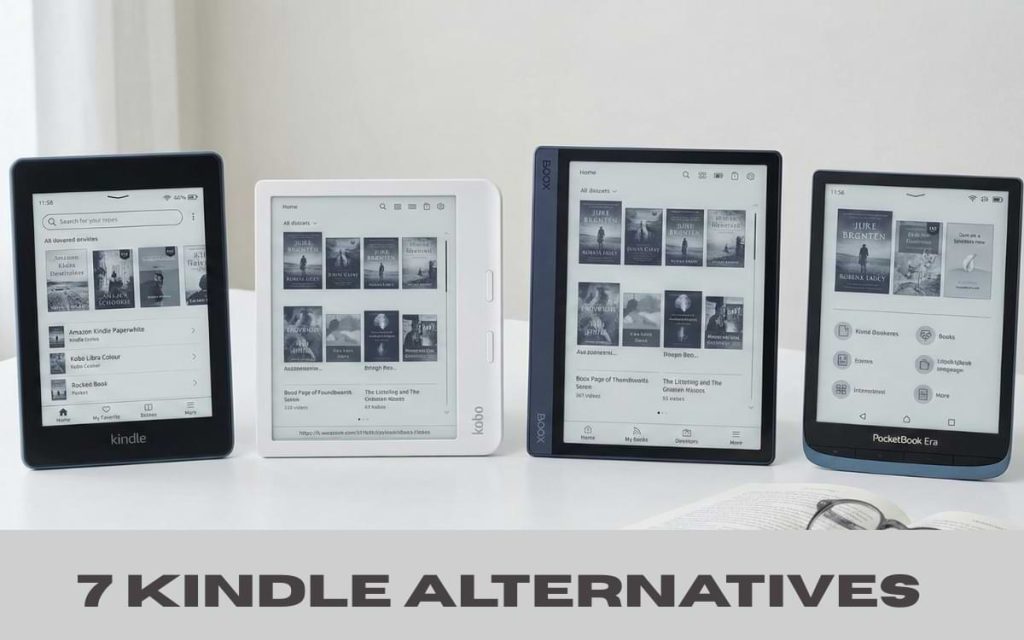
1. Kobo E-Readers: The Open Ecosystem Leader
| Model | Screen Size | Price (2026) | Key Differentiator |
| Kobo Clara Colour | 6″ | $179.99 (launched at $149.99) | First affordable color e-ink |
| Kobo Libra Colour | 7″ | $259.99 (launched at $219.99) | Physical page buttons + color |
| Kobo Sage | 8″ | $279 (not re-checked) | Premium note-taking |
| Kobo Elipsa 2E | 10.3″ | $399 (not re-checked) | Large-format note-taking |
Why Choose Kobo?
Kobo devices run on an open ecosystem that accepts ePub files natively, the industry-standard format used by most publishers outside Amazon. You can purchase books from independent bookstores, library systems, and competing platforms without conversion hassles.
The standout feature in 2026: seamless library integration. Through built-in Overdrive support, Kobo users can browse, borrow, and return library books directly from their device without visiting websites or downloading separate apps. This works in the United States, Canada, the United Kingdom, Australia, New Zealand, and over 15 other countries.
Kobo’s Strengths:
- Native ePub support (no conversion required)
- Direct library borrowing from 40,000+ libraries globally
- Comfort Light Pro adjustable color temperature on most models
- No ads or lock screen advertisements
- Supports 14 file formats, including CBZ/CBR for comics
- Pocket integration for saving web articles
- Dropbox integration for wireless file transfer
Kobo’s Limitations:
- Smaller bookstore selection compared to Amazon
- Slightly higher prices than comparable Kindles
- Note-taking features are less refined than Remarkable
- Slower software updates than competitors
- Build quality varies by model (Clara feels cheaper than Paperwhite)
2. Boox E-Readers: Android Flexibility Unleashed
| Model | Screen Size | Price (2026) | Unique Feature |
| Boox Page | 7″ | $269 | Compact Android e-reader |
| Boox Nova Air C | 7.8″ | $369 | Color e-ink + Android apps |
| Boox Tab Mini C | 7.8″ | $449 | Full Android tablet experience |
| Boox Note Air 3C | 10.3″ | $549 | Premium note-taking + color |
Why Choose Boox?
Boox devices run full Android operating systems, transforming them from dedicated e-readers into versatile e-ink tablets. You can install Kindle, Kobo, Nook, Google Play Books, Libby, and any other reading app simultaneously. This makes Boox the ultimate choice for readers who want access to every ecosystem without maintaining multiple devices.
The Android foundation enables unique capabilities: web browsing on e-ink screens (excellent for reading articles and research papers), running productivity apps like OneNote and Evernote, and even using apps like Spotify (though audio quality suits audiobooks better than music).
Boox’s Strengths:
- Access to every e-book ecosystem simultaneously
- Install any Android app (Gmail, Chrome, Notion, etc.)
- Superior PDF annotation tools with layers and templates
- Split-screen multitasking on larger models
- Physical page-turn buttons on most devices
- Exceptional build quality with premium materials
- Regular Android security updates
Boox’s Limitations:
- Significantly more expensive than Kindle or Kobo
- Steeper learning curve due to Android complexity
- Battery life is shorter than that of dedicated e-readers (still 2-3 weeks)
- Requires a Google account for Play Store access
- Less polished reading experience out of the box
- Limited customer service compared to major brands
When Android Makes Sense: If you read academic papers, annotate PDFs extensively, want multiple reading apps, or need e-ink for productivity apps, Boox delivers unmatched flexibility. Researchers, students, and professionals who read technical documents find Boox devices transformative.
Much like how RAM prices in 2026 force buyers to carefully evaluate whether they need DDR5’s flexibility or can save with DDR4, choosing between a dedicated e-reader and an Android-based Boox requires an honest assessment of your actual usage patterns.
3. PocketBook: European Alternative with Format Freedom
| Model | Screen Size | Price (2026) | Standout Feature |
| PocketBook Verse Pro | 6″ | $139 | Budget-friendly ePub reader |
| PocketBook InkPad Color 3 | 7.8″ | $329 | Affordable color e-ink |
| PocketBook Era | 7″ | $199 | Premium design, page buttons |
| PocketBook InkPad 4 | 10.3″ | $449 | Large-format reading |
Why Choose PocketBook?
PocketBook readers support an astounding 19 file formats out of the box. more than any competitor. This includes ePub, PDF, MOBI, DJVU, FB2, CBR, CBZ, and even Microsoft Word documents. For readers with diverse libraries built over the years, PocketBook eliminates conversion headaches entirely.
The European heritage shows in thoughtful features: built-in dictionaries in 24 languages, text-to-speech in 26 languages, and aggressive pricing that undercuts both Kindle and Kobo in many markets. PocketBook devices also integrate with Dropbox, Google Drive, and PocketBook Cloud for wireless file transfer.
PocketBook’s Strengths:
- Supports 19 file formats natively (most in the industry)
- Excellent international language support
- Competitive pricing (we have not re-checked PocketBook prices against Kobo)
- Physical page buttons on select models
- Long battery life (4-6 weeks typical use)
- No account required (fully functional offline)
- ABBYY Lingvo dictionaries included
PocketBook’s Limitations:
- Limited availability in North America (improving in 2026)
- Smaller accessories ecosystem
- No dedicated bookstore in many regions
- Build quality is slightly below that of premium competitors
- Software occasionally feels dated
- Customer support challenges for US customers
Best For: International readers, multilingual households, users with existing DRM-free libraries, and budget-conscious buyers who want format flexibility without Boox’s price premium.
4. Remarkable: The Note-Taker’s Choice
| Model | Screen Size | Price (2026) | Primary Use |
| Remarkable 2 | 10.3″ | $279 (device only) at the time; discontinued May 2026 | Digital note-taking |
| Remarkable Paper Pro | 11.8″ | $579 | Color note-taking + reading |
Why Choose Remarkable?
Update, November 2026: reMarkable discontinued the reMarkable 2 in May 2026 and replaced it with the Paper Pure at $399 (10.3-inch monochrome E Ink, Marker stylus included, still no frontlight; Notebookcheck, May 2026). The Paper Pro continues above it, and the Paper Pure does not work with reMarkable 2 styluses, so accessories do not carry over.
Remarkable devices prioritize one thing above all: replicating the feel of writing on paper. The low-latency stylus, textured screen surface, and purpose-built software create the closest experience to pen and paper available in 2026. For people who think by writing, sketchers, journalers, academics, and designers, Remarkable offers unmatched focus.
The reading experience is deliberately minimal. No bookstore, limited file format support (ePub and PDF), and no backlight on the Remarkable 2. This isn’t a limitation, it’s a feature. Remarkable strips away distractions to create a focused environment for deep reading and thoughtful annotation.
Remarkable’s Strengths:
- Industry-leading writing feel (3ms latency)
- Exceptional PDF annotation capabilities
- Distraction-free environment (no apps, notifications, or browser)
- Convert handwritten notes to text
- Send documents via email to the device
- Templates for planners, music sheets, and specialized notebooks
- Premium build quality (thin, lightweight, durable)
Remarkable’s Limitations:
- Expensive ecosystem (requires a $2.99/month Connect subscription for full features)
- Limited to ePub and PDF (no MOBI, AZW, etc.)
- No bookstore integration
- No frontlight on Remarkable 2 (available on Paper Pro)
- Cannot install apps
- High initial cost when including accessories (pen, folio)
The Subscription Reality: Remarkable’s Connect subscription ($2.99/month or $35.88/year in 2026) unlocks cloud sync, mobile apps, screen sharing, and unlimited cloud storage. While the device works without it, the subscription transforms it from a standalone notebook into an integrated productivity system. Factor this recurring cost into total ownership, over three years, subscription fees add $107 to the purchase price.
Similar to how Meta Quest pricing strategies layer hardware costs with ongoing content purchases, Remarkable’s model separates device and service costs, requiring buyers to calculate total ownership expenses.
Format Freedom: Understanding E-Book File Types
| Format | Kindle | Kobo | Boox | PocketBook | Remarkable |
| ePub | ❌ (convert) | ✅ Native | ✅ Native | ✅ Native | ✅ Native |
| ✅ Limited | ✅ Good | ✅ Excellent | ✅ Good | ✅ Excellent | |
| MOBI | ✅ Native | ❌ (convert) | ✅ (via apps) | ✅ Native | ❌ |
| AZW3/KFX | ✅ Native | ❌ | ✅ (Kindle app) | ❌ | ❌ |
| CBZ/CBR (Comics) | ❌ | ✅ | ✅ | ✅ | ❌ |
| DJVU | ❌ | ❌ | ✅ (via apps) | ✅ Native | ❌ |
Why Format Matters:
Amazon’s proprietary formats (AZW3, KFX) lock books to their ecosystem. Publishers and independent authors typically release in ePub, the open standard, making it universally compatible with non-Kindle devices. When you buy from Kobo, Barnes and Noble, Apple Books, Google Play Books, or independent publishers, you receive ePub files that work on Kobo, Boox, and PocketBook without conversion.
PDF support varies dramatically. Kindle’s PDF handling is functional but limited, no reflow, poor zoom controls, and difficult navigation. Boox and Remarkable excel at PDFs with advanced annotation tools, layer support, and smooth zooming. For academic papers, textbooks, and technical manuals, this difference is transformative.
Library Borrowing: The Game-Changer for Budget Readers
How Library Integration Works?
Most public libraries partner with OverDrive/Libby to offer digital lending. With a library card, you can borrow thousands of e-books and audiobooks at no cost beyond your annual library membership (often free for residents).
| Device | Library Method | Ease of Use | Global Availability |
| Kindle | OverDrive website → Send to Kindle | Moderate (requires computer) | Limited regions |
| Kobo | Built-in OverDrive (browse on device) | Excellent (fully integrated) | 20+ countries |
| Boox | Libby app (install from Play Store) | Good (requires app setup) | Anywhere Libby works |
| PocketBook | OverDrive website → Transfer files | Moderate (manual process) | Most countries |
Real Cost Savings
If you read 2-3 books monthly at an average purchase price of $12 per book, library borrowing saves $288-432 annually. Over a five-year device lifespan, that’s $1,440-2,160 in avoided book purchases, far exceeding the cost difference between a Kindle and a Kobo.
The catch: popular titles often have waitlists, and borrowing periods (typically 14-21 days) create time pressure. However, most library apps allow placing holds, automatically downloading when available, and most readers find the selection more than adequate for their needs.
Privacy and Data: What Your E-Reader Knows About You
Amazon Kindle Data Collection:
- Every page turn and reading speed
- Time spent on each page
- Highlights and annotations
- Books purchased, borrowed, and started but not finished
- Search queries within books
- Dictionary lookups
- Connected to your Amazon account (purchase history, demographics)
Alternative E-Reader Privacy:
| Brand | Data Collection | Account Required | Offline Functionality |
| Kobo | Reading stats (synced optionally), purchases | Yes (for store access) | Good (sideloaded books work) |
| Boox | Minimal (no built-in tracking) | No (for e-reader features) | Excellent (fully functional) |
| PocketBook | Minimal (optional cloud sync) | No | Excellent (fully functional) |
| Remarkable | Minimal (document sync only) | Yes (for cloud features) | Good (local storage works) |
Going Fully Private:
For maximum privacy, Boox and PocketBook devices can function entirely offline without accounts. Sideload DRM-free ePub and PDF files via USB, never connect to WiFi, and your reading remains completely private. This appeals to readers concerned about surveillance capitalism or those in professions (law, medicine, journalism) where reading material confidentiality matters.
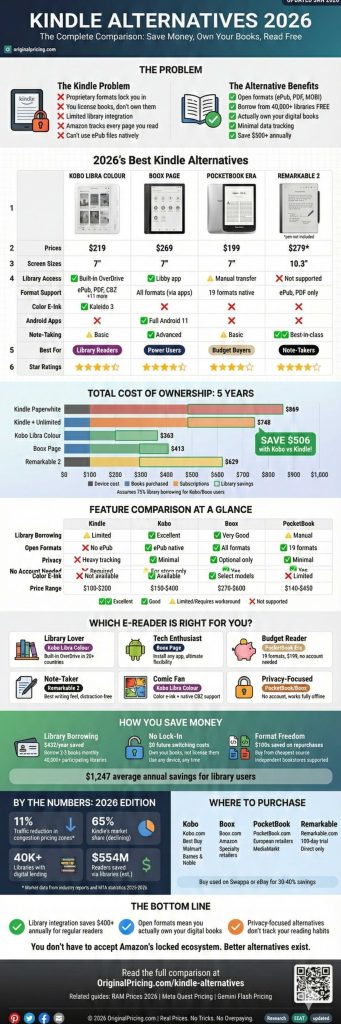
Price-to-Value Analysis: Total Cost of Ownership (2026)
5-Year Ownership Cost Comparison: Note, 23 November 2026: the book figures in this table assume far fewer purchases than the assumptions listed under it. A version recalculated on those assumptions is in the section on sources below.
| Device | Initial Cost | Books (5yr) | Subscriptions | Total 5-Year Cost |
| Kindle Paperwhite | $149 | $720 (Amazon purchases) | $0 | $869 |
| Kindle + Unlimited | $149 | $0 (unlimited reading) | $719.40 (60 months at $11.99) | $868.40 |
| Kobo Libra Colour | $259.99 | $144 (+ library borrowing) | $0 | $403.99 |
| Boox Page | $269 | $144 (cross-platform purchases) | $0 | $413 |
| Remarkable 2 + Connect | $279 + $50 (pen) | $120 (focused reading) | $180 (5 years) | $629 |
Assumptions:
- Average 2 books/month reading pace
- Amazon books average $12, other stores $12, library books $0
- Kindle Unlimited assumes 3+ books monthly (worth the $11.99/month subscription)
- Kobo/Boox users mix purchases and library borrowing (75% library, 25% purchases)
- Remarkable users read less but annotate extensively
The Library Advantage:
Readers who maximize library borrowing through Kobo or the Libby app on Boox achieve the lowest total cost of ownership, often saving $500+ over five years compared to purchasing everything from Amazon. This analysis doesn’t even account for the environmental impact of choosing digital over physical books or the space savings in smaller living situations.
Just as understanding Gemini’s flash pricing model reveals the true cost of AI usage beyond headline rates, calculating e-reader total ownership costs requires looking beyond the initial device price to books, subscriptions, and ecosystem lock-in.
Switching from Kindle: What You Need to Know
Can You Keep Your Kindle Books?
Not easily, and not legally in most cases. Kindle books come with DRM (Digital Rights Management) that prevents transfer to non-Kindle devices. While DRM-removal tools exist, using them violates Amazon’s Terms of Service and may violate copyright law in your jurisdiction.
Your Options:
- Dual-device strategy: Keep your Kindle for Amazon purchases, use an alternative for library books and new purchases elsewhere
- Start fresh: Accept that Kindle books remain on Kindle app (phone, tablet, computer) and build a new library on your alternative device
- Prioritize library borrowing: Minimize future locked-in purchases by maximizing library usage
- Choose Boox: Install the Kindle app alongside other reading apps, accessing all ecosystems on one device
Migration Checklist:
- Export highlights and notes from Kindle (use tools like Clippings.io or Readwise)
- Inventory your most-reread books and consider repurchasing DRM-free versions
- Set up library card integration before your new device arrives
- Research independent bookstores supporting your genre (many offer DRM-free ePub)
- Install Calibre software for managing and converting DRM-free e-books
- Consider the audiobook ecosystem (Audible locks you in similarly; alternatives include Libro.fm)
Special Use Cases: Matching Device to Reading Style
Academic and Technical Reading
Best choice: Boox Note Air 3C or Tab Mini C
Technical papers, textbooks, and research materials demand robust PDF handling. Boox devices offer split-screen viewing (reference material alongside notes), advanced annotation with layers, OCR for scanned PDFs, and the ability to run reference management apps like Zotero or Mendeley.
Students and researchers save hundreds of hours annually with proper PDF tools. The ability to highlight in multiple colors, add typed notes, sketch diagrams, and export annotations to other platforms creates a complete academic workflow impossible on basic e-readers.
Comic and Manga Readers
Best choice: Kobo Libra Colour or Boox Nova Air C
Color e-ink technology arrived at consumer-friendly prices in 2025-2026. While not as vibrant as LCD tablets, color e-ink displays comics and manga beautifully without the eye strain of backlit screens. Kobo’s native CBZ/CBR support makes comic reading seamless, while Boox allows installing dedicated comic apps like ComiXology and Tachiyomi.
Panel-by-panel zoom, customizable reading directions (left-to-right or right-to-left for manga), and proper aspect ratios separate dedicated e-readers from tablets. The reading experience during long sessions dramatically favors e-ink’s paper-like appearance.
Travel and Portability
Best choice: Kobo Clara Colour or PocketBook Verse Pro
Six-inch devices slip into coat pockets and travel bags effortlessly. The Kobo Clara Colour and PocketBook Verse Pro deliver full reading functionality in compact, lightweight packages. Battery life extends 4-6 weeks on a single charge, eliminating charger anxiety during long trips.
Library integration proves especially valuable for travelers, download books before departure without consuming luggage weight or worrying about running out of reading material mid-trip.
Note-Taking and Journaling
Best choice: reMarkable Paper Pure, which replaced the Remarkable 2 in May 2026, or Remarkable Paper Pro
No device matches Remarkable’s writing feel. The textured screen, low-latency stylus, and distraction-free interface create an environment conducive to thinking through writing. Templates for planners, music notation, meeting notes, and creative sketching provide structure without constraint.
The Remarkable Paper Pro adds frontlight and color, addressing the two main criticisms of the Remarkable 2, though at a significant price premium ($579 vs $279 for the Remarkable 2 before it was discontinued; the Paper Pure that replaced it is $399).
Where these figures come from
We re-read three sources on 23 November 2026: The eBook Reader (19 May 2026) for the Kobo increases, Notebookcheck (6 May 2026) for the reMarkable Paper Pure, and the Boox shop front page. Correction: the reMarkable 2 price in the reMarkable table had lost its first digits in an earlier edit and showed as 9; it has been restored to $279, the device-only price this page recorded before the model was discontinued.
Kobo US prices, launch to now
| Model | Launch price | Before May 2026 | Since May 2026 | May 2026 step | Rise since launch |
|---|---|---|---|---|---|
| Kobo Clara BW | $129.99 | $139.99 | $159.99 | $20.00 (14.3%) | $30.00 (23.1%) |
| Kobo Clara Colour | $149.99 | $159.99 | $179.99 | $20.00 (12.5%) | $30.00 (20.0%) |
| Kobo Libra Colour | $219.99 | $229.99 | $259.99 | $30.00 (13.0%) | $40.00 (18.2%) |
All nine prices are from The eBook Reader; the differences and percentages are our arithmetic. The report gives no exact date for the change: the new prices appeared on Amazon first and on the Kobo site while the article was being written. In Canada, it says, the two Clara models rose by $10 and the Libra Colour by $30. The report does not mention the Kobo Sage or the Elipsa 2E, so their prices in this guide are unchanged and marked as not re-checked.
reMarkable: Notebookcheck gives the Paper Pure at $399, €399 or £359 with a Marker stylus, and $449 with the Marker Plus. It has a 10.3-inch monochrome screen and no front light, replaces the discontinued reMarkable 2, and does not work with reMarkable 2 styluses. The article does not give a price for the Paper Pro or for the Connect subscription, so the $579 and $2.99 a month in this guide were not re-checked. Boox: the shop front page listed the Note Air6 C, Note Mini C and Palma 3 without prices and did not show the Page, Nova Air C, Tab Mini C or Note Air 3C, so the Boox prices in this guide are unconfirmed and those models may no longer be current.
Our analysis: five-year cost on the stated assumptions
The assumptions listed under the ownership-cost table are two books a month at $12, with Kobo and Boox owners buying a quarter of their books and borrowing the rest. Over five years that is 120 books, or $1,440.00 if all are bought and $360.00 if 30 are bought. Recalculated on that basis, with the May 2026 Kobo price:
| Route | Device | Books over five years | Subscription | Five-year total |
|---|---|---|---|---|
| Kindle Paperwhite, buying every book | $149.00 | $1,440.00 (120 books) | $0 | $1,589.00 |
| Kindle Paperwhite with Kindle Unlimited | $149.00 | $0 | $719.40 (60 months at $11.99) | $868.40 |
| Kobo Libra Colour, a quarter bought | $259.99 | $360.00 (30 books) | $0 | $619.99 |
| Boox Page, a quarter bought | $269.00 | $360.00 (30 books) | $0 | $629.00 |
| reMarkable Paper Pure with Connect | $399.00 | $120.00 (as in the table above) | $179.40 (60 months at $2.99) | $698.40 |
The Kindle Paperwhite price, the Kindle Unlimited price, the Boox Page price and the Connect price are the figures already on this page and were not re-checked today. On these numbers a reader who borrows three books in four saves $969.01 over five years against buying every book for a Kindle, well above the $500 mentioned above, and $248.41 against Kindle Unlimited. The May 2026 increase added $40.00 to the Kobo route, 6.9% of what it cost at the launch price ($579.99). The earlier table reached $869 for the Kindle because it counted 60 books, one a month, and it priced five years of Kindle Unlimited at $599 when 60 months at $11.99 is $719.40; that cell and its total have been corrected.
Source status on 23 November 2026
| Figure on this page | Source | Status |
|---|---|---|
| Kobo Clara BW $159.99, Clara Colour $179.99, Libra Colour $259.99 and their launch prices | The eBook Reader (19 May 2026) | Confirmed |
| reMarkable Paper Pure at $399; reMarkable 2 discontinued | Notebookcheck (6 May 2026) | Confirmed |
| reMarkable 2 at $279 device only | Earlier version of this page | Restored after a formatting error; the model is discontinued and the figure is not sourced |
| Kobo Sage $279 and Elipsa 2E $399 | None | Not re-checked |
| Boox Page $269, Nova Air C $369, Tab Mini C $449, Note Air 3C $549 | Boox shop | Not confirmed; the models were not on the shop front page read today |
| PocketBook prices; Kindle Paperwhite $149; Kindle Unlimited $11.99; Connect $2.99 a month; reMarkable Paper Pro $579 | None | Not sourced on this page |
| Kindle market share of 65 to 70% | None | Not sourced; removed |
| Colour models cost $70 to $150 more | None | Not sourced; replaced with the $20 Kobo Clara difference |
Frequently Asked Questions
How much have Kobo prices risen?
In the US the Clara BW has gone from $129.99 at launch to $159.99, the Clara Colour from $149.99 to $179.99 and the Libra Colour from $219.99 to $259.99. That is $30, $30 and $40, or 18% to 23%, with most of it in the May 2026 increase reported by The eBook Reader.
Is the reMarkable 2 still sold?
No. Notebookcheck reported on 6 May 2026 that reMarkable had discontinued it and replaced it with the Paper Pure at $399, which includes a Marker stylus but does not work with reMarkable 2 styluses.
Is Kobo better than Kindle?
Not universally, it depends on your priorities. Kobo excels at library integration, open formats, and avoiding Amazon’s ecosystem, but Kindle offers a larger bookstore, better synchronization across devices, and superior annotation search. Choose Kobo if you value format freedom and library borrowing over ecosystem convenience and maximum selection.
Can I read Kindle books on Kobo?
Not directly. Kindle books use proprietary formats with DRM protection that prevents reading on non-Amazon devices. You can use the Kindle app on phones, tablets, and computers to access Kindle books, or choose a Boox device that runs the Android Kindle app alongside the native reading app.
Do I need an account to use an e-reader?
Kindle requires an Amazon account. Kobo requires a Rakuten Kobo account to access the bookstore, but it works with sideloaded books without an account. Boox and PocketBook function fully without any account, perfect for privacy-focused readers who exclusively use library books or DRM-free purchases. Remarkable requires an account for cloud features, but works offline for local notes.
How long do e-readers last?
Quality e-readers typically last 5-7 years or longer with proper care. E-ink screens don’t degrade like LCD displays, batteries maintain capacity well, and there are no moving parts to fail. The main reason for replacement is software obsolescence (older devices stop receiving updates) or the desire for new features like color e-ink or improved lighting. Many readers use devices for a decade without issue.
Can I borrow library books on e-readers?
Yes, but ease varies by device. Kobo offers the best library experience with built-in OverDrive integration in 20+ countries. Boox users install the Libby app for excellent library access. Kindle supports OverDrive in some regions, but requires using a computer to send books to the device. PocketBook requires manual file transfer after downloading from library websites.
Are color e-ink readers worth it in 2026?
For specific use cases, absolutely. Color e-ink excels at comics, manga, textbook diagrams, and seeing book covers in full color. However, color e-ink displays show muted colors similar to newspaper color photos, not the vibrant saturation of tablets. If you primarily read text-heavy novels, color adds minimal value. If you read graphic novels or heavily illustrated non-fiction, color enhances the experience significantly. In the Kobo range the colour premium is $20: the Clara Colour is $179.99 against $159.99 for the Clara BW.
What’s the best e-reader for someone leaving Kindle?
Kobo Libra Colour offers the smoothest transition: familiar size, physical page buttons like older Kindles, robust bookstore, excellent library integration, and reasonable pricing ($259.99 since May 2026, $219.99 at launch). It supports ePub natively, eliminating format concerns for non-Amazon purchases. The learning curve is minimal, and you’ll immediately appreciate not seeing ads on the lock screen.
Do e-readers work without WiFi?
Yes, all e-readers work perfectly offline once books are loaded. Download books while connected, then disable WiFi to maximize battery life. Boox and PocketBook can function entirely without ever connecting to WiFi if you sideload books via USB. Offline functionality is one of e-readers’ core advantages over tablets, no distractions, no notifications, just reading.
How do I transfer books to my e-reader?
Methods vary by device and format. For Kobo, either purchase directly from the Kobo store (automatic WiFi download), borrow from integrated libraries (automatic download), or connect via USB and drag ePub files to the device. For Boox, use any Android file transfer method, including USB, Dropbox, Google Drive, or email. For PocketBook, connect via USB or use supported cloud services. All devices also support transferring books through Calibre e-book management software on your computer.
Can I read PDFs on e-readers?
All e-readers support PDFs, but quality varies dramatically. Basic devices like Kindle and Kobo handle PDFs adequately for reflowable documents but struggle with complex layouts. Boox and Remarkable excel at PDFs with advanced annotation tools, smooth zooming, and reflow capabilities. For academic papers and technical documents, choose a device with robust PDF support; the experience difference is substantial.
Final Recommendation Matrix
| If You Value… | Choose This Device | Why |
| Library borrowing ease | Kobo Libra Colour | Built-in OverDrive in 20+ countries |
| Maximum app flexibility | Boox Page or Nova Air C | Full Android OS, install any reading app |
| Budget pricing | PocketBook Verse Pro | $139 with 19 format support |
| Writing and notes | reMarkable Paper Pure (the Remarkable 2 was discontinued in May 2026) | Best writing feel, distraction-free |
| Comic and manga reading | Kobo Libra Colour | Color e-ink + native comic format support |
| Academic PDF work | Boox Note Air 3C | Advanced annotations, large screen |
| Privacy focus | PocketBook or Boox | No account required, works fully offline |
| Largest book selection | Kindle Paperwhite | Stick with Amazon if the ecosystem works for you |
Updated 23 November 2026. Sources: The eBook Reader, 19 May 2026 and Android Authority. reMarkable 2 discontinuation and Paper Pure pricing: Notebookcheck (May 2026).